Exploratu: AR Currencies
Publisher Description
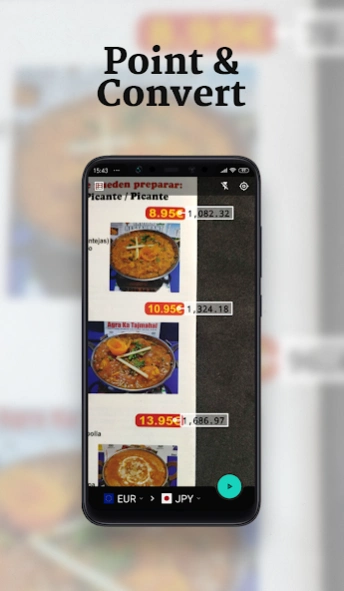


Calculate foreign exchange rates directly in AR with this currency converter.
Exploratu is the fast and easy way to convert prices in real-time through the camera using AR!Just point at the prices and watch the exchange besides the original currency 📸💲. It uses your camera and OCR (Optical Character Recognition) technology to extract the original price, it converts into your desired foreign money and shows the resulting price using AR (Augmented Reality) next to the original amount.
Exploratu provides rates for 147 currencies, updated daily, for updated and accurate exchange rates. Nevertheless, it still allows going offline and being able to use it on those well-deserved vacations! ✈☀🏖😎✌
The different currency and foreign exchanges can be easily searched using their name, the country where they are used, symbol and others. It even includes an automatic detector for making this step even easier!
🇫🇷 🇪🇸 🇺🇸 🇨🇳 🇮🇹 🇲🇽 🇬🇧 🇹🇷 🇩🇪 🇹🇭 🇯🇵 🇰🇷
Features:
• Use your camera to convert money.
• 147 different currencies.
• Manual currency conversion mode.
• Offline mode.
• Modern minimalistic design.
• Simple and easy to use.
• Easy selection of currencies: search with the name of the currency, code, country of use, symbol...
• Automatic detection of the country/coin of origin and destination.
• Light/Dark theme depending on system config.
• Completely free!
Contact: hello@izadi.xyz
Thank you for your support!
About Exploratu: AR Currencies
The company that develops Exploratu: AR Currencies is Izadi Egizabal. The latest version released by its developer is 1.0 .
To install Exploratu: AR Currencies on your Android device, just click the green Continue To App button above to start the installation process. The app is listed on our website since 2024-06-18 and was downloaded 0 times. We have already checked if the download link is safe, however for your own protection we recommend that you scan the downloaded app with your antivirus. Your antivirus may detect the Exploratu: AR Currencies as malware as malware if the download link to xyz.izadi.exploratu is broken.
How to install Exploratu: AR Currencies on your Android device:
- Click on the Continue To App button on our website. This will redirect you to Google Play.
- Once the Exploratu: AR Currencies is shown in the Google Play listing of your Android device, you can start its download and installation. Tap on the Install button located below the search bar and to the right of the app icon.
- A pop-up window with the permissions required by Exploratu: AR Currencies will be shown. Click on Accept to continue the process.
- Exploratu: AR Currencies will be downloaded onto your device, displaying a progress. Once the download completes, the installation will start and you'll get a notification after the installation is finished.
Program Details
System requirements
Download information
Pricing
Version History
version 1.3.0
posted on 2024-06-18
- fix currency rate update 💹
- edge to edge app ↕️
- small improvements and fixes ✨
version 1.2.0
posted on 2023-12-03
minor fixes and improvements
version 1.1.0
posted on 2022-07-12
Reworked internals to improve all aspects of the app 🚀:
- New currency provider with 147 options 💸
- Smoother AR tracker 📸
- General stability & performance optimisations 🏃💨
version 0.2
posted on 2020-06-19
- Internal refactor for the app to work more smoothly.
- Camera preview quality improved.
- Camera overlay definition improved.
- More smooth pinch to zoom.
version 0.15
posted on 2019-08-28
- Exploratu now detects prices divided by commas! ✅
- After many requests, the currency symbol is displayed alongside the price in AR Mode! 💶
- Auto location of the origin country fixed! 📍
- Improvements in how the conversions are displayed in the AR Mode. ✨
- Dark/Light themes for the AR Mode! 🌞🌚
- Minor fixes and optimisations 🐛.
Please keep your feedback coming, it's been very insightful so far! 😄🎉
